My Recipe Box: My Cookbook
- 4.6
- Rating
- 1.00M
- Installs
- Free
- Price

 Analysis by App-foxy
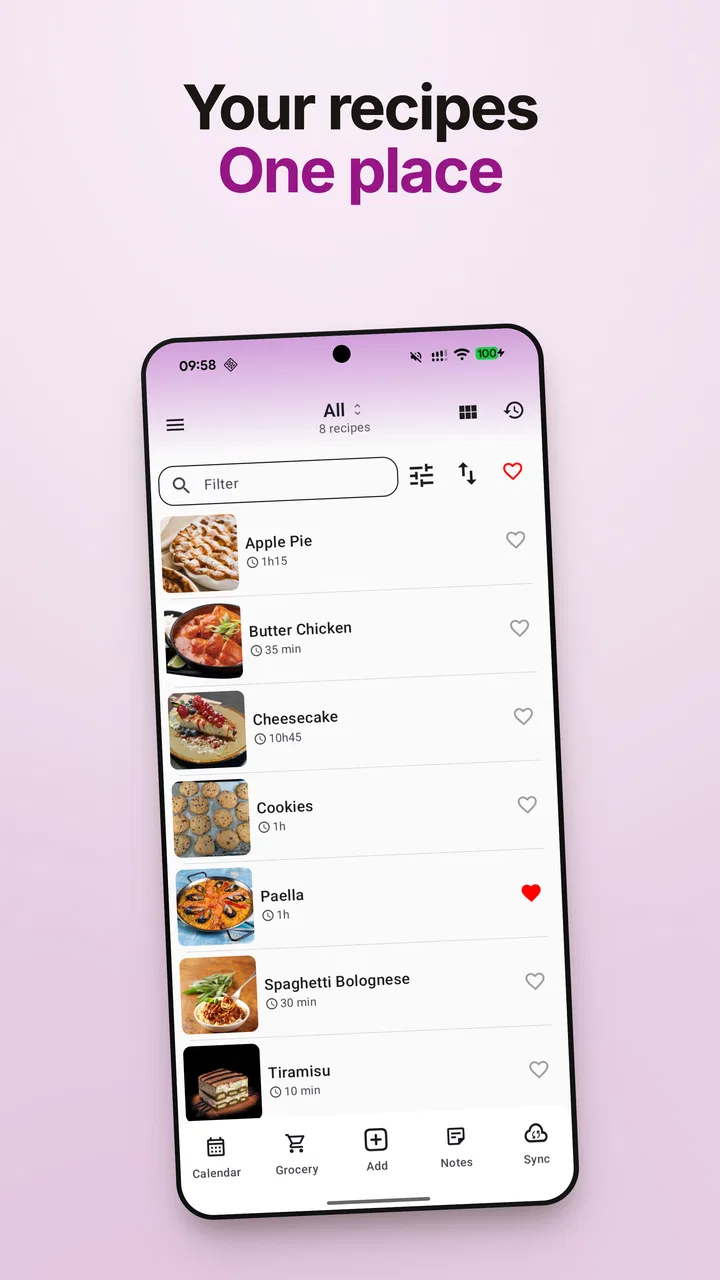
I like recipe apps that stay out of the way when I am standing in the kitchen, and My Recipe Box: My Cookbook is built around that simple idea. Rather than trying to act like a social food network or a meal-delivery service, it focuses on keeping recipes together in one digital cookbook. That makes it a practical Food & Drink app for anyone who has recipes scattered across screenshots, notes, browser bookmarks, and old paper cards.
After spending time with it, my impression is that its appeal comes from organization rather than spectacle. The app is free to download, and its basic promise is easy to understand: save the recipes you already use, arrange them in a more manageable way, and return to them when you cook. It is developed by CmonApp, has an average rating of 4.6 from around 45 thousand ratings, and has passed the one-million-install mark. Those figures suggest that the straightforward cookbook approach has connected with a large audience.
How My Recipe Box fits into everyday cooking
The first thing I noticed is that this is best viewed as a personal recipe keeper, not as a replacement for every cooking website or food magazine. If I want inspiration from a large stream of professionally photographed dishes, I would still look elsewhere. If I already have recipes I trust and want one place to keep them, this app makes much more sense.
You May Also Like

 Blood Strike: 2.5 Anniversary
Blood Strike’s Loadouts Turn Every Drop Into a Tactical Gamble
A close look at Blood Strike’s custom loadouts: how fast access to signature weapons reshapes its battle royale rhythm, rewards preparation, and narrows the gap between fights.

 Pandora - Music & Podcasts
Pandora’s Music Is Easy to Start, but Harder to Recover
Pandora’s strength is its low-effort path from a seed to a station. Its weak spot is how much confidence it asks you to place in connection, setup, and quiet recovery.

 8 Ball Pool
 Is Built on Rivalries, Rematches, and Routine
A close look at the rivalries, rematches, shared routines, and unanswered safety questions that turn a quick pool match into a persistent mobile community.

 Samsung Music
’s Quiet Strength Is Playing What You Already Own
Its reach comes less from spectacle than from dependable access to a personal library. That simplicity is both the app’s strongest retention engine and its ceiling.

 AccuWeather: Weather Radar
AccuWeather Review: A Quick, Clear Forecast for Everyday Decisions
For everyday plans, the best forecast is the one you can understand quickly. AccuWeather makes rain timing, radar, and local conditions easy to act on, with a few trade-offs.

 Hill Climb Racing
Why Hill Climb Racing Still Turns Crashes Into One More Run
A tiny car, a bumpy hill and one more upgrade: Hill Climb Racing keeps resurfacing because its simple chaos makes every near-miss feel personal.
More From Our News Desk



That distinction matters because many people do not really need more recipes. They need to find the one they already liked last month. My Recipe Box: My Cookbook is aimed at that problem. It gives a home to family recipes, clipped ideas, handwritten favorites that have been typed up, and dishes I want to try later without making my phone’s general notes app carry the whole burden.
The store summary describes it as a recipe book organizer, and that description is accurate without telling the whole story of its usefulness. The value is in creating a repeatable habit: save a recipe when you discover it, give it a sensible place, and use the same collection the next time you shop or cook. That is less exciting than discovering a new culinary community, but it is often more useful on a busy weekday.
In one realistic scenario, I might plan three dinners on Sunday. I can gather the recipes I want to use, keep them together in the app, and open the relevant one while preparing ingredients. Later, instead of searching through messages or trying to remember which website contained the dish, I can return to the saved cookbook. The benefit is small at first, but it grows as the collection becomes more personal.
Saving recipes without creating another digital mess
A recipe organizer only helps if it reduces clutter. My advice is to decide on a simple structure before importing or entering a large number of recipes. Categories such as weekday meals, baking, family favorites, and recipes to test are more useful than creating dozens of narrow folders that make browsing slower.
This is one of the less obvious trade-offs with a personal cookbook: organization is powerful, but it depends on the choices I make. If I save everything without naming or grouping it consistently, the app can become another crowded drawer. I get better results when I treat it like a real cookbook and use clear titles, familiar categories, and notes that will still make sense several months later.
I also find it useful to separate “want to try” recipes from dishes I have already cooked successfully. That prevents an attractive but untested idea from being confused with a dependable dinner. It is a basic workflow, but it turns the app from passive storage into a lightweight cooking reference.
Why a dedicated cookbook beats ordinary notes
A general notes app is flexible, and it may be enough for someone who saves only a handful of recipes. The trouble begins when recipes compete with shopping lists, work reminders, copied addresses, and other unrelated text. A dedicated cookbook gives the collection a clear purpose, so I am less likely to lose a favorite dish inside an endless list.
My Recipe Box also feels more appropriate for people who collect recipes from different places. A paper cookbook is pleasant to browse, but it is not always convenient when I am shopping or cooking away from home. Browser bookmarks are quick, yet they can point to pages that change, contain distracting material, or require extra searching before I reach the ingredients. Keeping the recipe in a personal collection can make repeated use more direct.
There is still a reason to keep the alternatives around. A notes app is usually better for free-form meal planning, a browser is better for discovering current recipes, and a printed book is better for cooks who prefer to keep phones away from flour and water. The dedicated app sits between those choices: more focused than notes, more personal than a recipe website, and more portable than paper.
What the free access means for value
The app is free, which makes it easy to test without committing money at the start. That is important for this kind of tool because its usefulness depends on personal habits. Someone who rarely cooks or saves only one or two recipes may discover that a simple notes file is enough. Someone with a growing collection can try the organizer first and decide whether it earns a permanent place in their routine.
There are in-app purchases ranging from $0.99 to $29.99 per item. I would not treat those purchases as automatically necessary. The free entry point is the clearest part of the value proposition; whether an optional purchase is worthwhile depends on what it unlocks in the version available to the user and how heavily the app is used. I would first build a small collection, test the everyday workflow, and only then consider paying for an upgrade.
That approach keeps the cost decision sensible. If the app saves me time every week, an optional purchase may feel reasonable. If I only open it occasionally, paying more would be difficult to justify when free note-taking tools already cover my needs. The important point is that the free starting price lowers the risk, while the paid value should be judged by actual use rather than by the size of the recipe collection alone.
Small workflows that make the app more useful
One useful habit is to clean a saved recipe immediately instead of postponing all organization. I would give it a recognizable title, place it in the category where I will look first, and add a short note if the recipe needs an adjustment. For example, I might record that I reduced the salt, doubled the vegetables, or used a different pan. Those details are more valuable than a vague memory that the dish was “good.”
Another practical workflow is to keep a short group of reliable recipes separate from experimental ones. When I am tired or shopping late, I want to find meals I already understand. On a quieter weekend, I can browse the untested section and choose something new. This turns the same collection into both a safety net and a source of variety.
I would also avoid saving duplicate versions of the same recipe unless there is a real reason. If I keep one original and one adapted version, I should label the difference clearly. Otherwise, a search through several nearly identical entries can create uncertainty at exactly the moment I need the instructions. This is not a glamorous feature, but it is the kind of housekeeping that determines whether a recipe organizer remains pleasant after months of use.
Where the experience may feel limited
The focused design can also feel narrow. People who expect extensive discovery tools, restaurant ordering, nutrition analysis, or an active community may find the app less satisfying than a broader cooking platform. Its strength is keeping a personal cookbook together; that same focus means it is not the right single destination for every food-related task.
There is also an unavoidable effort involved in building a useful collection. A recipe organizer cannot magically turn a chaotic set of screenshots into a perfectly arranged cookbook without some input from me. If I am unwilling to sort, rename, or refine recipes, the result may still feel disorganized. The app reduces the problem, but it does not remove the need for a little maintenance.
Another consideration is reading comfort. A phone is convenient, but a small screen is not ideal for every kitchen. I may need to keep checking the display while mixing, or scroll through longer instructions with messy hands. Someone who prefers a large tablet, printed pages, or a voice-led cooking experience should think of this app as a storage and reference tool rather than a complete kitchen setup.
Compatibility is fairly broad for an older mobile device, with support beginning at Android 7.0. The current version is 8.7.6, so users on reasonably recent Android phones should find the app relevant to their device environment. The content rating is Everyone, which also makes it approachable for a household cookbook shared around different age groups, although the practical experience will still depend on the phone and the cook’s preferred way of following instructions.
Who will get the most from it?
I would recommend My Recipe Box to home cooks who repeatedly return to the same dishes and want those recipes in one dedicated place. It is especially suitable for people inheriting family recipes, collecting ideas from multiple sources, or trying to move away from paper scraps and scattered screenshots. The personal nature of the collection is a real advantage: the app becomes more useful as it reflects the meals I actually make, not just the meals that look appealing online.
It can also work well for someone learning to cook who wants to build a dependable starter cookbook. Instead of trying to remember every successful meal, the user can keep a record of what worked and gradually add personal adjustments. Over time, that can be more useful than repeatedly searching for a supposedly perfect version of a familiar dish.
I would be more cautious recommending it to a person who wants automatic meal planning, detailed dietary calculations, or constant recipe discovery. Those needs point toward a more specialized service. I would also suggest skipping it if a plain notes app already handles a very small recipe list comfortably. There is no benefit in adding a dedicated organizer simply because it exists; the switch is worthwhile when finding and reusing recipes has become a recurring annoyance.
My buying decision after using it
My final view is positive, but deliberately practical. My Recipe Box: My Cookbook delivers the most value when I use it as a long-term personal archive rather than as an entertainment app. The free access makes it easy to see whether that archive fits my habits, and the optional purchases should be considered only after I understand what I need from the app and how often I will use it.
With around 1 million installs, a 4.6 average, and a mature presence since its release on April 20, 2013, it has clearly had time to establish its place among recipe-keeping tools. I would not choose it for every cooking need, but I would choose it over a messy notes folder when my main goal is to maintain a usable digital cookbook.
My recommendation is to try the free version with a small, carefully chosen set of recipes. Add a few dependable meals, organize them in a way that matches how you shop and cook, and see whether returning to them feels easier than using your current method. If it becomes part of your weekly routine, the paid options may be worth examining. If not, you can skip the purchase and return to a simpler alternative without having made a costly commitment.
For me, that is the honest appeal of this app: it does not need to transform cooking to be useful. It simply gives favorite recipes a more deliberate home. Cooks who value order, repetition, and personal notes will likely appreciate that focus, while users seeking a complete food-planning ecosystem should look elsewhere.
FAQs for My Recipe Box: My Cookbook
01Is My Recipe Box: My Cookbook free to use?
My Recipe Box: My Cookbook offers a free version with basic features that allows you to store and manage your favorite recipes. However, premium features such as advanced meal planning and a larger storage capacity may require a subscription or one-time purchase. Check the app store for detailed pricing information.
02Can I share recipes with friends and family using the app?
Yes, My Recipe Box: My Cookbook allows you to easily share your favorite recipes with friends and family. You can share recipes via email, social media, or direct messaging apps. This feature makes it convenient to spread culinary inspiration and collaborate on meal planning with loved ones.
03Does the app support importing recipes from websites?
Absolutely! My Recipe Box: My Cookbook supports importing recipes directly from popular cooking websites. This feature streamlines the process of adding new recipes to your collection without manual entry, saving you time and ensuring accuracy. Make sure to check if your favorite sites are supported within the app.
04Is it possible to customize recipes in the app?
Yes, the app allows for full customization of recipes. You can adjust ingredient quantities, add personal notes, and even modify cooking instructions to suit your preferences. This flexibility ensures that you can tailor each recipe to meet your dietary needs and taste preferences.
05What kind of support does My Recipe Box: My Cookbook offer for dietary restrictions?
My Recipe Box: My Cookbook includes features to help manage dietary restrictions. You can tag recipes with dietary labels such as gluten-free, vegan, or low-carb. Additionally, the app can suggest recipe modifications or alternatives to accommodate specific dietary needs, ensuring a personalized cooking experience.
Pros
- User-friendly interface for easy navigation.
- Extensive database of diverse recipes.
- Customizable recipe organization options.
- Offline access for convenience on the go.
- Integration with shopping list apps.
Cons
- Limited free features without subscription.
- Occasional syncing issues between devices.
- No option for community recipe sharing.
- Ads can be intrusive in the free version.
- Limited dietary restriction filters.

My Recipe Box: My Cookbook
Gallery